


SeamlessPass: Leveraging Kerberos Tickets to Access the Cloud
Author: Abdulrahman Nour (Security Researcher at Malcrove)
(Figure 5 – Using SeamlessPass to acquire access tokens using compromised user Ticket-Granting Ticket (TGT)

TL;DR
We have created SeamlessPass, a tool that utilizes Microsoft’s Seamless SSO feature to acquire access tokens for Microsoft 365 services by leveraging on-premises Active Directory Kerberos tickets. SeamlessPass is particularly useful in red team scenarios where cleartext passwords are unavailable, but other forms of credentials, such as NTLM hashes or TGTs, are in hand. These access tokens can be further used with tools like ROADTools and AADInternals for enumeration or offensive exploitation.
The tool is available at https://github.com/Malcrove/SeamlessPass
The Story
.
The Beginning
During a recent red team engagement conducted by Malcrove, the team managed to achieve the core objective and acquired domain administrative privileges within the on-premises Active Directory environment. However, the client wanted to explore whether it is possible to escalate this attack to the cloud and acquire Global Admin privileges.
At this point, the team was able to authenticate to the on-premises AD as any user thanks to the extracted “KRBTGT” hash and the planted misconfigurable certificate template, but what about the cloud access? The team did not have the cleartext passwords and resetting them was off the table due to potential service disruptions and the need to maintain stealth. But is cleartext password the only way to authenticate?
.
What is Seamless SSO?
Fortunately no, Microsoft supports other authentication methods including Seamless SSO (Desktop SSO) which was enabled for our client. In short, this feature allows users to sign in to the cloud when they are connected to the on-premises AD environment. When the feature is enabled, a computer account (AZUREADSSOACC) with certain SPNs is created and its credentials are shared with Microsoft. When the user attempts to sign in, the browser requests a service ticket encrypted with AZUREADSSOACC’s key and shares it with Entra ID server which in turn decrypts it to identify the user and logs them in without requesting a password. More information can be found here (https://learn.microsoft.com/en-us/entra/identity/hybrid/connect/how-to-connect-sso-how-it-works)
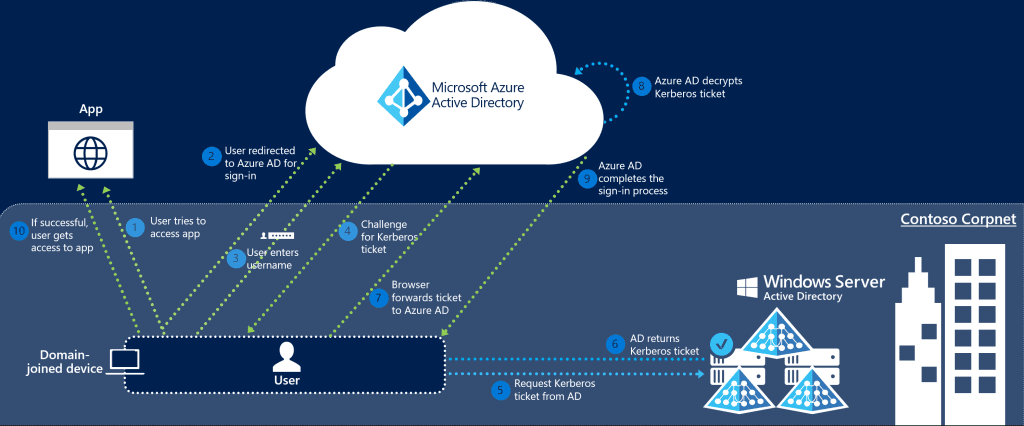
(Figure 1 – Seamless SSO request flow – Source Microsoft)
.
Seamless SSO Through the Browser
Seamless SSO use in red team operation is not a recent news, it has been documented and abused a lot in the past. However, most of the angles presented assumed that you already possess AZUREADSSOACC keys, but what if you do not? The concept is pretty much the same, but when it comes to the actual steps and tooling, it becomes foggy.
Although the team was in a privileged position to conduct a DC Sync attack and acquire AZUREADSSOACC keys, a strategic decision was taken not to do so. Each step conducted at the red team engagement is weighed with risks vs rewards principals. Since theoretically there was no technical limitations that prevents using Seamless SSO and there was a potential operational security risk from conducting the DC Sync attack, it was decided to avoid it.
So the plan is simple, right?
- Acquire a valid TGT for the target user (If you compromised a user and do not have any credentials, you can obtain a TGT using fake TGT delegation trick implemented in many tools such as Kekeo and Rubeus)
- Plant the ticket into login session (
NewCredentialslogon type maybe needed →Rubeus createnetonlyto the resecure) - Configure the browser to support Seamless SSO
- Pray for it to work 😅

(Figure 2 – Injecting stolen Ticket-Granting-Ticket (TGT) in memory using Rubeus)
The first two parts were straight-forward, configuring the browser for Seamless SSO took us some time of troubleshooting because most of the documentations are missing some key information.
To configure Seamless SSO at Firefox, you will need a couple of configuration:
- Add certain URLs to trusted zone:
- In navigation bar, type
about:config - Search for
network.negotiate-auth.trusted-urispreference - Add the following URL https://autologon.microsoftazuread-sso.com (Multiple URLs are separated by comma)
- In navigation bar, type
- Enable Windows SSO in settings:
- Go to Settings
- Enable “Allow Windows single sign-on for Microsoft, work, and school accounts”

(Figure 3 – Enabling Single Sign-on feature in Mozilla Firefox)
.
The last step is missed in pretty much every documentation about Seamless SSO configuration, but it can be found separately at FireFox documentation.
Once this is done, the rest was straight-forward, go to login.microsoftonline.com, enter user’s email and the browser will communicate with the KDC to get a valid service ticket and present it to the cloud server which should then let the user in.
It is worth noting that Seamless SSO would not bypass Multiple-Factor Authentication or conditional access policies in place. However, the team managed to get around this by targeting service accounts for initial account compromise which are usually excluded from MFA by design. Once access is retrieved, the full conditional access policy was enumerated for further exploitation and other bypasses were crafted.
Eventually, the team managed to acquire access to a Global Admin account while bypassing the conditional access policies in place, granting the team full control over client’s cloud environment.

(Figure 4 – Utilizing Seamless SSO to authenticate to target tenant using Global Admin account)
.
Limitations
While the previous technique worked fine and enabled us to gain access to the user accounts, it was not without its challenges. The process involved multiple steps, required some troubleshooting, and presented potential limitations in scalability and automation. We realized that a more streamlined and robust solution was necessary, particularly for use in similar future engagements.
.
Introducing SeamlessPass
This realization led to the development of SeamlessPass, a tool designed to automate the process we initially performed manually. SeamlessPass allows users to leverage various forms of credentials—such as TGTs, NTLM hashes, AES keys, or forged service tickets—to acquire Microsoft 365 access tokens efficiently, without needing to go through the cumbersome manual steps we encountered.
Use Case Scenarios
SeamlessPass can be used to obtain access tokens for Microsoft 365 services for tenants with enabled Seamless SSO feature. The access tokens can be then fed to other tools like the awesome ROADTools and AADInternals for further enumeration or offensive capabilities. The tool can be very handy in various situations where the cleartext password of the user is unavailable but other forms of access are obtainable such as:
- Using compromised user’s Ticket-Granting-Ticket (TGT) or forged Golden Ticket:
If a user is compromised and no credentials are available, a TGT can still be acquired using fake TGT delegation trick implemented in many tools such as Kekeo and Rubeus. Also in cases were “KRBTGT” key is available, valid TGTs can be forged as in known attacks like Golden, Diamond and Saphire Tickers.
At this case, the tool will interact with the domain controller to acquire a valid Service Ticket (TGS) which can then be exchanged for access token. - Using compromised user’s NTLM hash or AES key:
We always wanted to pass-the-hash to the cloud. Well, this is kind of possible now with the Seamless SSO. When SeamlessPass receives login credentials in forms of passwords, hashes or keys, it communicates with the domain controller to get TGT and TGS, then communicate with the cloud to exchange it for an access token. - Using
AZUREADSSOACC$account NTLM hash or AES key:
If you already have the hash or key ofAZUREADSSOACCcomputer account, and the user’s Security Identifier (SID). SeamlessPass can create the service ticket and authenticate to the cloud with “no interaction with the domain controller”. You can get the SID in many ways such as powersploit’sConvertTo-SIDor rpcclient’slookupnames
The tool can also be somehow useful in bypassing weak conditional access policies by manipulating the user agent and source IPs.
Examples
Our previous attack scenario could have been done in a single step by running.
seamlesspass -tenant corp.com -domain corp.local -dc dc.corp.local -tgt <base64_TGT>

SeamlessPass will also provide you with a ready-to-use command to feed the acquired token to ROADTools or AADInternals for further enumeration or exploitation.
For more information about installation and usage, please refer to the GitHub repo (https://github.com/Malcrove/SeamlessPass).
.
Final Note
We would like to thank the great people whose contributions and researches were key in creating this tool:
- SecureAuthCorp and all the contributors for Impacket
- Dr. Nestori Syynimaa for AADInternals
- Oliver Lyak for Certipy
- Dirk-jan for ROADTools